When someone searches “dentist near me” or “plumber in Austin,” Google shows a map with three businesses at the top. Those three spots get a huge share of the calls. This local SEO checklist walks you through 15 practical steps to give your business the best chance of landing there.
How Google decides local rankings
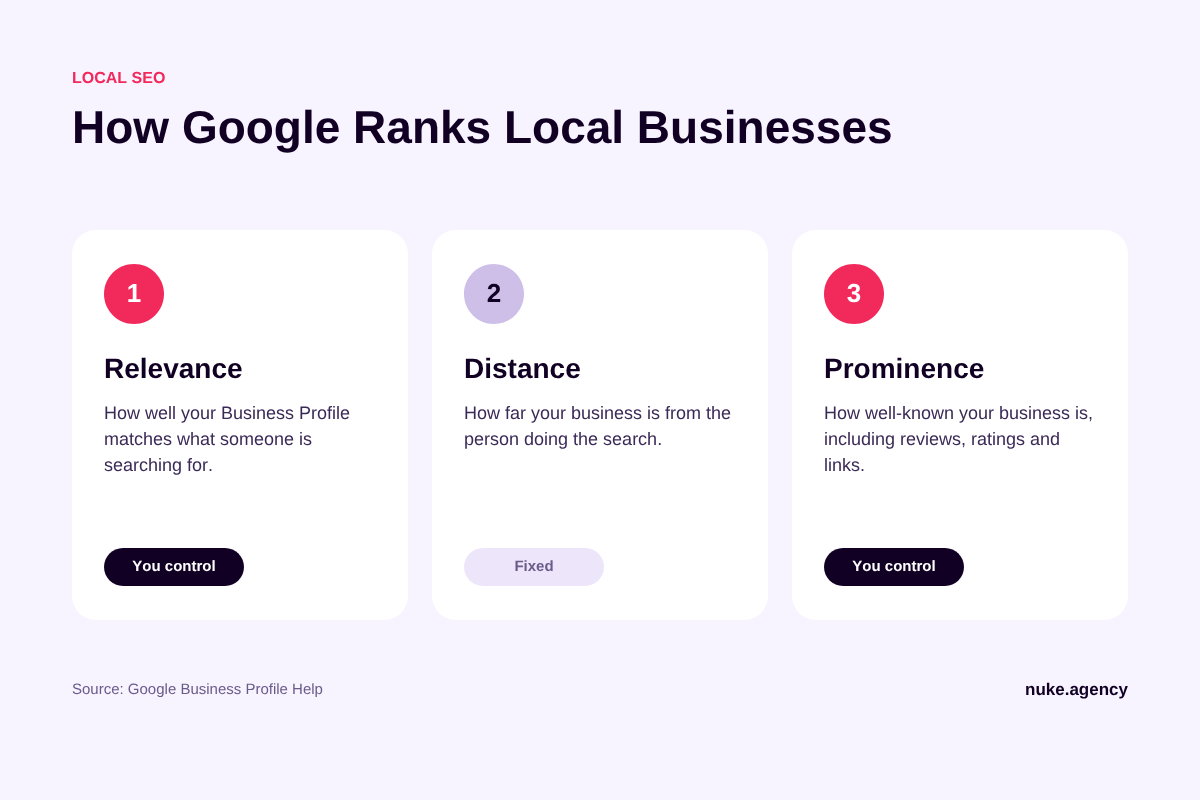
Google is unusually open about this. According to Google Business Profile Help, local results are based mainly on three things:
- Relevance: how well your Business Profile matches what someone is searching for.
- Distance: how far your business is from the person searching.
- Prominence: how well-known your business is, including reviews, ratings, and links from other websites.
You cannot change distance. Everything in this checklist is about improving relevance and prominence. Google also states plainly that “there’s no way to request or pay for a better local ranking.” Anyone who claims otherwise is not being honest with you.
Part 1: Google Business Profile
1. Claim and verify your profile
Verification tells Google you are authorized to represent the business. Unverified profiles are far less likely to show up. If you have not done it yet, start at business.google.com.
2. Pick the right primary category
Your primary category is one of the strongest relevance signals you control. Choose the most specific option that describes your core service, for example “Emergency Plumber” rather than just “Plumber” if that is your main business. Add secondary categories only where they genuinely apply.
3. Fill out every field
Google says businesses with complete and accurate information are more likely to appear in local results. Add your hours, service areas, services, attributes, and a clear description written for customers, not for search engines.
4. Keep your hours accurate, including holidays
Wrong hours lead to frustrated customers and bad reviews. Set special hours for holidays in advance.
5. Add real photos regularly
Upload photos of your team, your work, your premises, and your vehicles. Real photos build trust far more than stock images do.
6. Post updates
Use Google Business Profile posts for offers, events, and news. They keep your profile active and give searchers another reason to choose you.
Part 2: Reviews
7. Ask every happy customer for a review
Make it easy: send a direct review link by text or email right after the job is done. A steady stream of recent reviews matters more than a big batch from years ago.
8. Reply to every review
Google notes that replying “shows that you value their feedback.” Thank positive reviewers by name and respond calmly and helpfully to negative ones. Future customers read your replies.
9. Never buy or fake reviews
Fake reviews break Google’s policies and can get reviews removed or your profile restricted. It is never worth the risk.
Part 3: Your website
10. Keep your NAP consistent
Your business Name, Address, and Phone number should be identical on your website, your Google Business Profile, and every directory listing.
11. Create a page for each core service
A single “Services” page cannot rank for ten different services. Give each main service its own page that explains what you do, who it is for, pricing guidance, and how to book.
12. Create location pages only if they are genuinely useful
If you serve several towns, a page for each area can help, but only when each page contains unique, useful information such as local projects, testimonials, and area-specific details. Copy-pasted pages with only the city name swapped do not help.
13. Add LocalBusiness structured data
Schema markup helps search engines understand your name, address, hours, and services. Make sure it matches the information visible on the page.
14. Make sure your site is fast and mobile-friendly
Most local searches happen on phones. A slow, clunky site loses customers even after you win the click. If your site gets traffic but few enquiries, see our guide on why websites fail to generate leads.
Part 4: Citations and links
15. Build citations and local links
List your business on reputable directories (Bing Places, Apple Business Connect, Yelp, and industry-specific sites) with consistent NAP details. Then earn local links through sponsorships, local news, partnerships, and community events. These links feed directly into prominence.
Quick local SEO checklist (copy and keep)
- ☐ Google Business Profile claimed and verified
- ☐ Most specific primary category selected
- ☐ Every profile field completed
- ☐ Regular and holiday hours accurate
- ☐ Fresh photos uploaded monthly
- ☐ Posts published regularly
- ☐ Review request process in place
- ☐ Every review answered
- ☐ NAP consistent everywhere
- ☐ One page per core service
- ☐ Useful location pages (if relevant)
- ☐ LocalBusiness schema added
- ☐ Fast, mobile-friendly website
- ☐ Listed on key directories
- ☐ Earning local links
Frequently asked questions
How long does local SEO take?
Fixing your Business Profile can make a difference within weeks. Building reviews, citations, and links is ongoing, and most businesses see solid improvement over 3 to 6 months.
Do I need a website to rank in Google Maps?
You can appear without one, but a good website strengthens relevance and prominence and converts more of the people who find you.
What if I do not have a physical storefront?
Service-area businesses can hide their address and set a service area instead. You still need a real business location to verify.
Want help ranking locally?
Local SEO is one of the fastest ways for a small business to get more calls. NUKE handles Google Business Profile optimization, review strategy, citations, and local content. See our local SEO services, check plans and pricing, or get a free audit.
Wondering what it costs? Read how much SEO costs in 2026.