You paid for a website. Maybe you are even getting traffic. But the phone is quiet and the contact form is empty. If your website is not getting leads, the problem is usually not one big thing. It is a handful of small, fixable issues that make visitors leave before they reach out.
Here are nine fixes we see make the biggest difference for small business websites.
1. Make it obvious what you do within five seconds
Visitors decide very quickly whether they are in the right place. Your headline should say what you do, who you do it for, and where. Compare:
- Weak: “Welcome to Smith & Co.”
- Strong: “Emergency plumbing in Austin. 24/7, same-day repairs.”
Put that message at the top of the page, above the fold, with a clear next step right beside it.
2. Give visitors one clear call to action
“Learn more,” “Contact,” “Get started,” and “Subscribe” all on one screen creates confusion. Decide the single most valuable action, such as calling, booking, or requesting a quote, and repeat that one button throughout the page.
3. Speed up your website
Slow pages lose visitors before they ever see your offer. Google’s Core Web Vitals define what a good experience looks like:
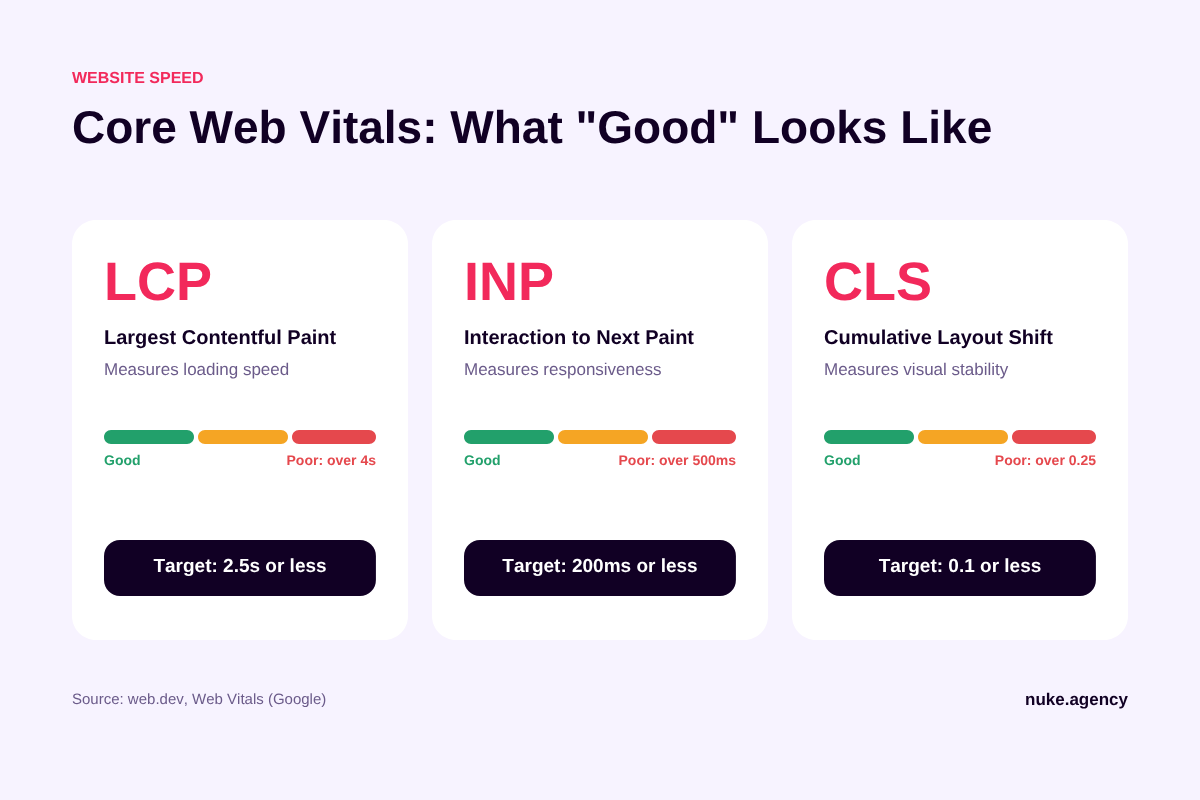
| Metric | What it measures | Good score |
|---|---|---|
| LCP (Largest Contentful Paint) | Loading speed | 2.5 seconds or less |
| INP (Interaction to Next Paint) | Responsiveness | 200 milliseconds or less |
| CLS (Cumulative Layout Shift) | Visual stability | 0.1 or less |
Common culprits are huge uncompressed images, too many plugins, heavy page builders, and cheap hosting. Test your pages with Google PageSpeed Insights and fix the biggest issues first.
4. Design for phones first
Most local searches happen on mobile. Check your site on an actual phone:
- Is the phone number tap-to-call?
- Are buttons big enough to tap easily?
- Does text fit without zooming?
- Do pop-ups block the content?
5. Simplify your contact form
Every extra field reduces the number of people who finish the form. For a first enquiry, name, email or phone, and a short message are usually enough. Ask the rest on the follow-up call. Then test the form yourself to make sure submissions actually reach your inbox and do not land in spam.
6. Add proof that you are trustworthy
People hire businesses they trust. Add:
- Genuine reviews and testimonials, ideally with names and photos
- Before-and-after photos or case studies
- Certifications, licenses, and memberships
- Photos of your real team instead of stock images
- Clear pricing guidance or starting prices
Never invent reviews or numbers. Fake proof is easy to spot and damages trust permanently.
7. Match your pages to what people searched
If someone searches “kitchen remodeling cost” and lands on a generic homepage, they leave. Give each core service its own page, answer the questions people actually ask, and send ad traffic to focused landing pages instead of the homepage.
8. Make it easy to reach you in more than one way
Some people prefer calling, some prefer forms, some prefer messaging. Offer the options your customers actually use, and show your phone number and email clearly in the header or footer.
9. Track what is happening
You cannot fix what you cannot see. Set up:
- Google Analytics to track visitors and form submissions
- Google Search Console to see which searches bring people in
- Call tracking if phone calls are your main lead source
Then review the data monthly. Which pages get traffic but no enquiries? That is where to focus next.
A quick lead-generation checklist
- ☐ Clear headline: what, who, where
- ☐ One primary call to action, repeated
- ☐ LCP under 2.5 seconds on mobile
- ☐ Tap-to-call phone number
- ☐ Short, tested contact form
- ☐ Real reviews and proof
- ☐ One page per core service
- ☐ Analytics and conversion tracking live
Frequently asked questions
How many leads should my website get?
It depends heavily on your industry and traffic. Instead of comparing to averages, track your own conversion rate (enquiries divided by visitors) and improve it month by month.
Do I need a new website or can I fix my current one?
Many sites can be improved without a full rebuild. If the site is very slow, impossible to edit, or built on outdated technology, a rebuild may be cheaper in the long run.
Will SEO fix my lead problem?
SEO brings more visitors. If the site does not convert, more traffic just means more people leaving. Fix conversion first, then scale traffic. Read our local SEO checklist once your site is ready.
Turn more visitors into customers
NUKE designs fast, conversion-focused websites and fixes the speed, tracking, and messaging issues that cost you leads. See our website design services, compare pricing, or request a free website audit.